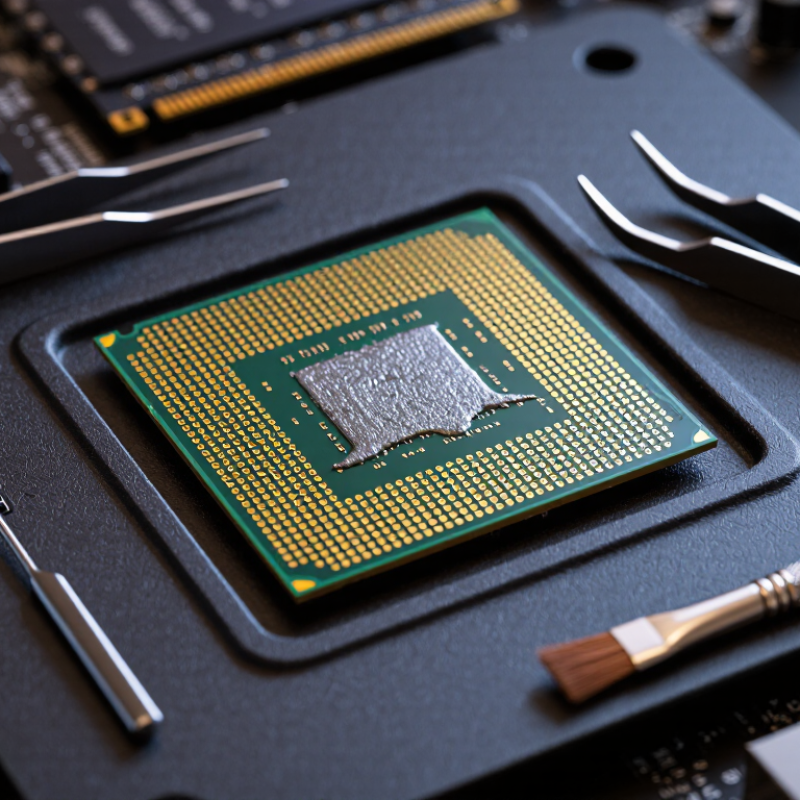
| What thermal paste is | Thermal paste is a heat-transfer compound applied in a thin layer between a processor’s heat spreader and a cooler. It fills microscopic gaps that would otherwise trap air. | Apply it to the processor’s intended contact surface, not to pins, socket contacts, or other electrical connections. |
| How it can reach processor pins | Paste may spread from an oversized application, be pushed outward when the cooler is mounted, or transfer from a tool or finger during handling. Paste can also be smeared onto contacts while installing or removing a processor. | Use a modest amount and lower the cooler evenly. Avoid touching the underside of the processor or the motherboard socket. |
| Conventional nonconductive paste | Many common pastes use silicone-based material with ceramic or other electrically insulating fillers. Their exact composition varies. | “Nonconductive” does not mean harmless to contacts: residue can interfere with reliable electrical contact or make cleaning difficult. Check the product’s safety and application instructions. |
| Electrically conductive compounds | Some thermal compounds contain electrically conductive metal particles. Liquid-metal products commonly use gallium alloys and conduct electricity. | Keep conductive compounds away from pins, socket contacts, circuit traces, and other exposed electronics. A spill can cause an electrical short when the system is powered. |
| Processor pins and socket contacts | Some processors have pins on the processor package; other designs place delicate contacts in the motherboard socket. Both types of contact can be damaged or obstructed by contamination. | Identify the contact location before handling the processor. Do not bend pins or press debris deeper into a socket. |
| If paste gets on contacts | Contamination may prevent a dependable connection and can lead to failed startup, memory or device detection issues, or intermittent operation. The result depends on the compound and where it lands. | Turn the computer off, unplug it, and do not power it on until the area is clean and fully dry. If contamination is inside a delicate socket, consider professional repair. |
| Cleaning guidance | For accessible, sturdy surfaces, high-purity isopropyl alcohol and a lint-free material are commonly used for removing thermal compound. | Use minimal liquid, avoid force and abrasive tools, and let the area dry completely. Do not flood a socket or scrub delicate contacts; follow the processor and compound manufacturers’ instructions. |
| Liquid-metal compatibility | Gallium-based liquid metal can react with aluminum and may damage aluminum heat sinks. It is electrically conductive and can spread easily. | Do not use it on aluminum surfaces or near exposed electrical contacts. Use only where the cooler and processor materials are explicitly compatible. |
| Prevention checklist | Clean the processor’s heat-spreader surface, keep the paste container and applicator away from contacts, and use only the amount recommended for the application. | Mount the cooler carefully, inspect for overflow before powering on, and consult a qualified technician if pins or socket contacts are bent or contaminated. |